
CONVIVIOPOS FOR PIZZA BY THE SLICE AND TAKEAWAY KITCHENS
From counter to collection. By the kilogram, too.
Pizza by the slice, prepared food and takeaway portions. Set a price per kg, enter the weight at the till and collect products and requests in one clear order.

SALES BY THE KILOGRAM
Weight becomes the price.
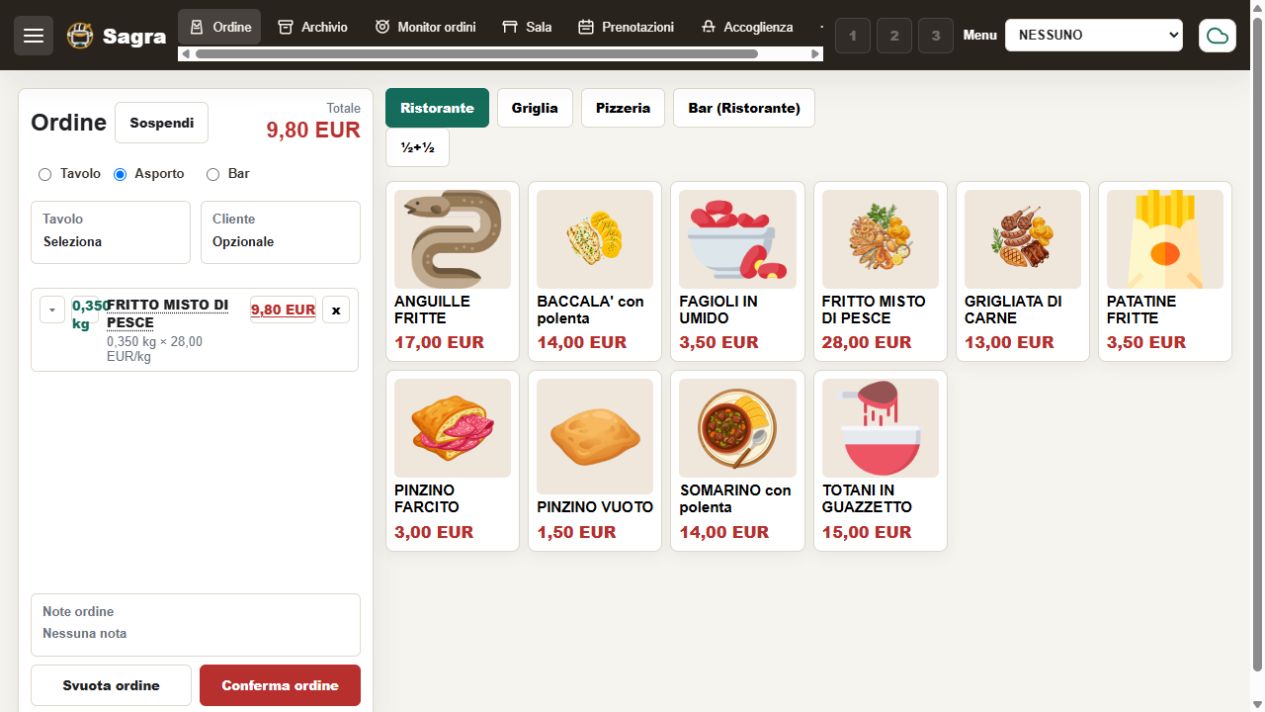
For pizza slices and prepared food sold by the kilogram: set the price per kg and enter the weight at the till. ConvivioPOS calculates the line total and keeps the weight and amount in the order.
CONVIVIOPOS · SERVICE AT YOUR FINGERTIPS
Fewer steps.
More control.
Designed to reduce interactions and limit opportunities for mistakes. The controls are where you need them: directly on the order data.
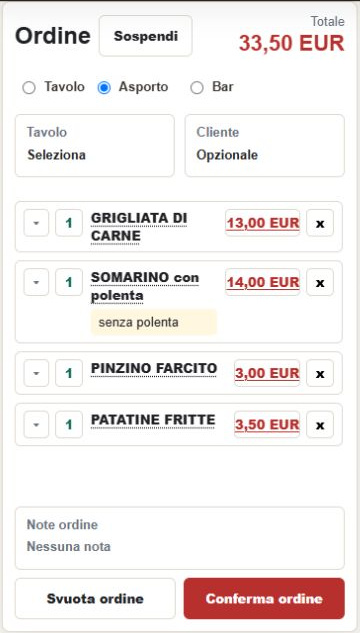
Tap the price.
To change it, work directly on the price itself.
Open the order line.
Add notes and options to the item you just added.
Tap the quantity.
Increase or reduce the portions directly from the order line.
Your service, organised.
The menu at a glance.
Images and variations help you select products and record preparation requests.
Give collection a reference.
Record the customer and collection date and time on takeaway orders. Find the details without separate notes.
The kitchen follows preparation.
Configure departments and printers for orders. The order monitor provides a dedicated view of work in progress.
Make sales easier to read.
Record payments with configured methods, including combinations. Item statistics help you review the menu and selected period.
From preparation to reports.
Four steps to bring ConvivioPOS into your work.

01
Prepare the counter.
Create items and images; for products sold by the kilogram, enable sale by weight and set the kg unit and price.
02
Record collection.
Choose takeaway and enter the customer, date and time.
03
Send the order.
Add products and capture preparation requests, then send the order to the configured departments.
04
Record payment.
Complete payment and consult sales and reports.
Try it in your business.
ConvivioPOS is free to use. The Windows package includes images, sample databases and manuals.